Faster Decisions, Powered by Your Existing Records
ExtractIQ combines a simple, intuitive SharePoint digital library with a private AI chatbot trained only on your records. Staff can browse like a familiar file system, search with rich filters, or just ask questions in plain language—and get answers grounded in your actual history, not the public internet.
From Stored Records to Everyday Insight
Most organizations have decades of engineering, financial, legal, and public records scattered across paper archives, network drives, and legacy systems. Even after digitization, staff still struggle to find what they need quickly—and new employees rely heavily on institutional memory.
ExtractIQ closes this gap. We deliver a SharePoint-based digital library that feels familiar to non-technical users, arranged around your own categories and classifications, and a private AI chatbot that lets anyone ask questions conversationally. Together, they turn your historical records into a living decision asset.

Two Ways to Discover, One Source of Truth
ExtractIQ is built on a single, well-structured SharePoint digital library. Users can either navigate and search
directly, or ask questions through the AI History Chatbot—both powered by the same governed content.
SharePoint Digital Library
Learn how ExtractIQ grew from a records management challenge into a full-service digital library platform serving regulated industries.
AI History Chatbot
A conversational interface to your history. Ask questions in natural language and receive answers grounded only in your approved records, with links back to the source documents.
Private LLM, Private Data
All content from your SharePoint system is fed into a private large language model. No public data, no training on the open web—just your own records, governed by your access controls.
A Digital Library Anyone Can Use
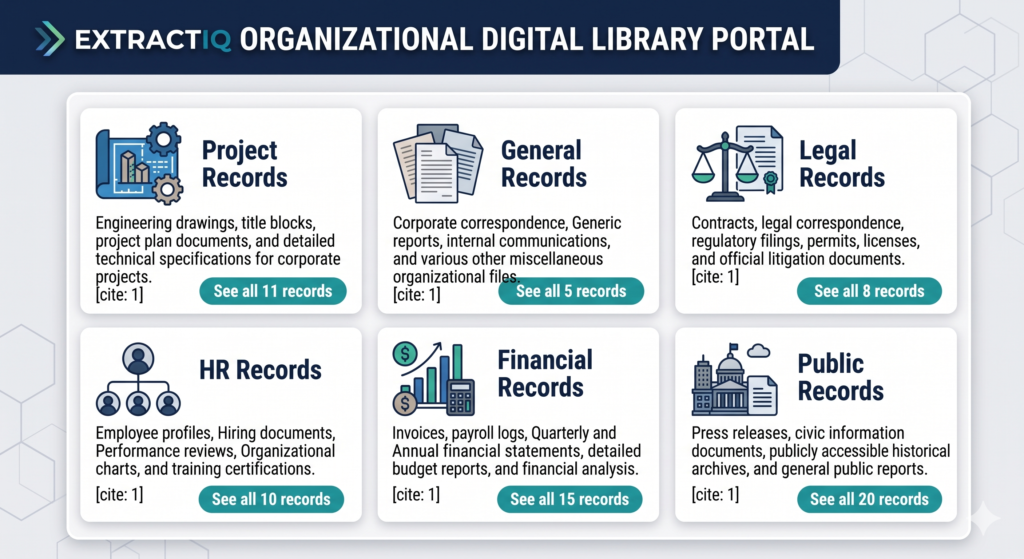
The ExtractIQ digital library is built on Microsoft SharePoint, but presented through a clean portal that feels approachable to non-technical users. Tiles and navigation reflect how your organization actually works—projects, general records, legal, HR, financial, and public records—rather than IT-centric structures.
Users can browse folders like a traditional file system, with consistent naming and clear categories, or jump straight into global search. Filters for record type, year, document category, and more make narrowing results feel like an online shopping experience, not a technical query.
Simple, Intuitive Entry Point
A branded portal provides a single starting point for all users. From here, staff can access project documents, general records, financial and legal files, HR content, and public records—or jump directly into search.
Portal tiles, top navigation, and a clear “home” behavior keep orientation obvious, even for occasional users and new staff.
Search Like Google—Across Your History
Users simply type a keyword, and SharePoint searches inside PDFs, scanned documents, filenames, and metadata. Results show previews, file locations, and document types so users can quickly judge relevance.
Multiselect filters refine results in real time, helping staff who don’t yet know your systems or history find the right records without guesswork.
Folders Organized for Clarity and Speed
For users who prefer browsing, folders are arranged around your own data categorization and classification. Breadcrumbs show exactly where you are, “Home” returns to the portal, and “Search” jumps to global search.
Within any folder, users see filenames, descriptions, document numbers, and key metadata in a clean grid—everything needed to understand a document before opening it.
A Library That Supports Daily Operations
Faster access to project records, reduced time spent searching, consistent structure across departments, and better onboarding for new staff all flow from a library that matches how your organization actually works.
Historical paper archives are protected, while reliable access during emergencies and critical events becomes part of normal operations—not a special project.
Ask Questions, Get Answers Instantly
The ExtractIQ AI History Chatbot provides a simple conversational interface to your digital library. Instead of searching, filtering, or knowing where information lives, staff can ask questions in plain language—just as they would ask a colleague—and receive answers grounded in your actual records.
The chatbot does not replace your digital library—it makes it usable by everyone. Executives, new hires, and field staff can all access the same authoritative information without training or system expertise.
Business Benefits of an AI History Chatbot
Faster decisions by reducing time spent searching for background information. Lower risk by ensuring decisions account for past commitments, actions, and constraints captured in your records.
Executive accessibility with no training required, continuity despite staff turnover, better use of archives, and consistent answers—everyone sees the same, authoritative information.
No Configuration. No Coding. No Ongoing Burden.
The AI History Chatbot is delivered as part of the ExtractIQ managed service. You do not need to design prompts, configure models, label data, or write code.
We connect the chatbot to your digital library, ensure answers are grounded in your records, manage updates as new documents are added, and maintain accuracy and governance—so your team can focus on decisions, not technology.
Specialist Services for Hard-to-Read History
We capture value from documents that are often considered too difficult or risky to digitize: very old or fragile paper, faded or low-quality scans, large-format drawings, and handwritten records where feasible.
These records become part of the same governed library and are available to both search and the chatbot, extending the reach of your institutional memory.
Designed for Trust, Not Guesswork
Answers are based only on your approved records—no public or external data. Clear references to source documents show exactly where each answer comes from.
The private LLM respects your existing SharePoint permissions and governance, ensuring that users only see what they are authorized to see, whether they are searching the library or chatting with the bot.
Why ExtractIQ for Discovery
Capture, Organize, and Discover are delivered as a single, managed service — so your digital
history works as one system, not three separate projects
AI-Powered, Library-First
We start with a solid SharePoint library and then layer AI on top—ensuring every answer is backed by a real document.
Aligned to How You Work
Portals, folders, and metadata mirror your own categories and classifications, not generic templates.
Private LLM on Your Data
The chatbot is trained only on your SharePoint content, with no external training data or public sources.
Managed Service Model
We handle capture, organization, AI configuration, and ongoing tuning—so your team never has to become AI engineers.
Ready to Unlock the Value in Your History?
Start with a Digital History Assessment and see how your records can become a living digital asset.
Contact us