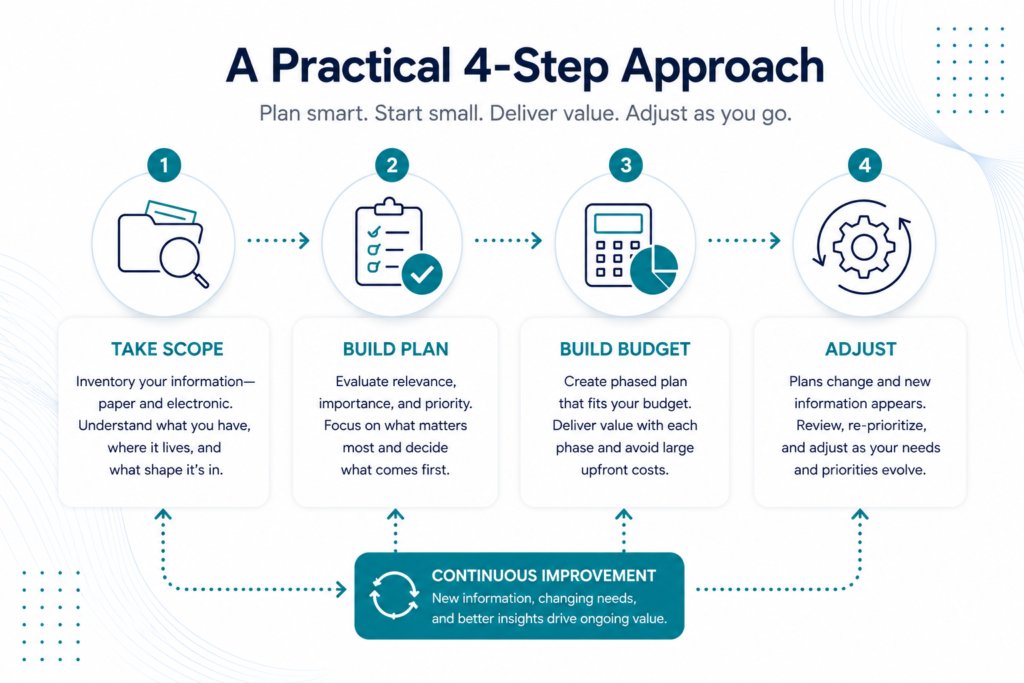
A Practical 4-Step Approach
Going digital can sound expensive before the project even begins.
There may be years of paper records, shared drives full of files, information spread across different systems, and no clear picture of how much of it is actually useful. Add scanning equipment, software licenses, implementation costs, and the time required to sort everything out, and it’s easy to assume digitalization requires a major upfront investment.
It doesn’t have to.
A phased approach allows businesses to start with the information that matters most, spread costs over time, and begin delivering usable results without waiting for the entire project to be completed.
Whether your information currently lives in filing cabinets, shared drives, legacy systems, cloud storage, or some combination of all of them, the process can start with four practical steps.
Step 1: Take Scope
Before deciding what to digitize, migrate, automate, or connect, you need to understand what you actually have.
Start by creating a high-level inventory of the information your organization holds. Don’t get caught up trying to catalog every individual page or file. At this stage, you’re building a picture of the overall information environment.
For paper records, note things such as:
- Approximate age
- Physical condition
- High-level classification, such as Accounts Payable 1960–1980
- Business area, such as Legal, Projects, Procurement, Engineering, or Finance
- Record format, such as loose pages, bound books, loose-leaf binders, drawings, or oversized documents
- Approximate quantity based on boxes, shelves, drawers, drawing sizes, or other practical measurements
The goal isn’t perfect precision. You don’t need someone counting thousands of individual pages.
You need enough information to understand the size, condition, and makeup of what you’re dealing with.
Don’t forget electronic information
Digitalization isn’t only about paper.
Many organizations already have large amounts of electronic information, but that doesn’t necessarily mean the information is organized, accessible, or useful.
Include existing electronic sources in the inventory, such as:
- Shared drives and network folders
- PDFs and scanned documents
- Spreadsheets
- Cloud storage
- Legacy applications
- Databases
- Email repositories
- Existing document management systems
- Department-specific storage locations
Look for duplication, inconsistent naming, inaccessible formats, information trapped in old systems, and files that employees struggle to locate.
A file being digital doesn’t automatically make it usable.
By the end of this step, you should have a high-level map of where your business information lives and what you’re working with.
Step 2: Build the Plan
Once you know what you have, the next question is more important:
What actually matters?
Not every record deserves the same amount of time, money, or attention.
Perform a second review of the inventory and evaluate each group of information based on three things.
Relevance
Consider how likely the information is to be needed.
For example:
- Is it critical to current operations?
- Could it be needed later?
- Might Legal need it?
- Could Engineering need it for future maintenance?
- Does it support compliance or regulatory requirements?
- Does it have historical value?
- Is anyone actually using it?
Importance
Determine what needs to happen to the original information.
Some records may no longer have value and can be destroyed according to applicable retention requirements.
Others may need to be captured digitally before the originals are destroyed.
Historically significant, legally required, or operationally critical records may need to be retained even after they have been digitized.
Priority
Now combine relevance and importance to establish a rough priority.
The records that support current operations or solve an immediate business problem may come first.
A collection of rarely accessed historical records might come much later.
This is where a potentially overwhelming project begins to become manageable.
Instead of asking, “How do we digitize everything?”
You’re asking, “What should we tackle first?”
Step 3: Build the Budget
This is where digitalization projects can quickly become intimidating.
The mistake is assuming everything has to be funded and completed at once.
It doesn’t.
Use the inventory and priorities you’ve already established to divide the project into manageable phases.
Each phase should have a defined outcome and deliver something useful to the business.
For example, Phase 1 might focus on information needed by an active department. Once complete, those employees have access to a usable digital library while work begins on Phase 2.
That means the organization begins receiving value before the entire project is finished.
Spread the investment over time
If the project will be funded through operating expenses, each phase can be paced around the amount the business is comfortable investing each month.
Instead of a large capital expense upfront, the project becomes a predictable operating cost.
The inventory can then be used to create an overall schedule showing:
- Project phases
- Monthly investment
- Expected completion dates
- Delivery milestones
- Priority information
- Dependencies between phases
If additional funding becomes available, a phase can be accelerated.
If priorities change, the schedule can change with them.
Avoid unnecessary upfront costs
A digitalization project doesn’t necessarily require purchasing scanners, building infrastructure, paying large software licensing fees, or investing heavily in technology before the first record is processed.
Where possible, look for a solution that allows costs to scale with the work being completed.
A predictable monthly operating expense can make a large project much easier to approve, manage, and adjust than a significant upfront capital investment.
More importantly, you’re paying to achieve a business outcome rather than simply buying technology.
Step 4: Adjust
Even the best plan will change.
That’s normal.
Once employees begin using newly accessible information, adoption may be higher than expected and the business may decide to accelerate the project.
Additional paper records might be discovered in another storage area.
A department may uncover electronic files nobody realized existed.
The physical condition of older records may turn out to be worse than the original inventory suggested, increasing the time required to capture them.
Business priorities may change.
Funding may increase or decrease.
When that happens, go back to the appropriate step.
If new information is discovered, add it to the inventory in Step 1.
If its importance changes, revisit Step 2.
If funding or timing changes, update the schedule and budget in Step 3.
The plan should support the business, not trap it.
What About Electronic Records?
It’s easy to think a digitalization project is finished once paper has been scanned.
For many organizations, that’s only part of the problem.
Electronic information can be just as difficult to manage when it’s scattered across folders, applications, inboxes, cloud platforms, and legacy systems.
The same four-step process applies.
Inventory what exists. Determine what matters. Prioritize it. Then decide how the information should be organized, migrated, connected, or made accessible.
This can also be an opportunity to address issues that developed over years of organic growth, including duplicate files, inconsistent folder structures, outdated versions, inaccessible formats, and information isolated inside individual departments.
The goal isn’t simply to create more digital files.
It’s to create an information environment people can actually use.
Digitalization Is the Beginning, Not the End
Once business information is accessible and organized, new possibilities begin to open up.
Employees can find information faster.
Systems can share information instead of requiring people to move it manually.
Workflows can automatically route information to the right people.
AI can help classify, extract, summarize, and surface relevant information.
Previously disconnected information can become part of larger automated business processes.
That’s why a digitalization project shouldn’t be measured by how many pages were scanned or how many files were migrated.
The real measure is what the organization can do with that information afterward.
Start Small, Deliver Value, Then Keep Going
Going digital doesn’t have to begin with a massive budget or an all-or-nothing transformation project.
Start by understanding what you have.
Prioritize what matters.
Break the work into phases that fit the available budget.
Deliver something useful at the end of each phase.
Then adjust as the business learns more.
This approach allows organizations to begin realizing the benefits of digitalization sooner while maintaining control over cost, timing, and priorities.
Most importantly, it creates a foundation for what comes next.
ExtractIQ helps organizations turn business information into something they can find, use, connect, and act on, creating the foundation for smarter workflows, automation, and AI.